CTRL + H no SSMS

Fala pessoal, tudo bem com vocês?

Espero que sim e vamos de mais dicas.

Essa dica é bem simples, e ajuda muito quando queremos substituir textos de uma consulta T-SQL.

Para isso, clique em qualquer lugar da sessão aberta e use as teclas de atalho “CTRL + H” dentro Microsoft SQL Server Management Studio(SSMS), dessa forma será exibido a caixa de diálogo para você escrever a palavra que será substituída na consulta.

No exemplo a seguir, foram localizados 2 palavras iguais, mas veja que apenas uma foi aplicado a Substituição.

Bacana né?

Espero ter ajudado com essa simples contribuição.
Desejo a todos uma ótima semana, um grande abraço e até o próximo post pessoal!

Felippe Santos

CTRL + H at SSMS

Hi Guys, how are you doing?

I hope you are doing well! Here I come to share one more tip with you.
This tip is really simple and really helps when we want to replace texts of a T-SQL consult.
For that click on any space in blank of the open session and use the hotkeys “CTRL + H” into Microsoft SQL Server Management Studio(SSMS),
this way it will be showed a dialog box for you to write a word that will be replaced at the consult.
In the following example, it was found two equal words, but it was aplied a replacement to one of them.

That’s cool, isn’t it?

I hope I helped you with this simple contribution.
I wish you all have a great week, warm hugs and I´ll see you on our next post guys.

Santos, Felippe
CTRL + F no SSMS

Fala pessoal, tudo bem com vocês?

Espero que sim e vamos de mais dicas.

Essa dica é bem simples, e ajuda muito quando queremos localizar uma palavra ou parte dela em uma consulta T-SQL com muitas linhas.

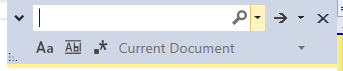
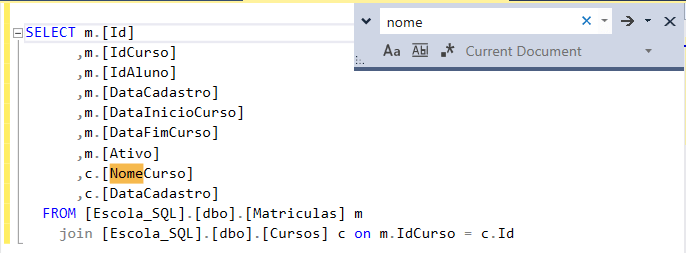
Para isso, clique em qualquer espaço em branco da sessão aberta e use as teclas de atalho “CTRL + F” dentro Microsoft SQL Server Management Studio(SSMS), dessa forma será pesquisado o local onde está a palavra digitada na consulta.

Após digite o texto que deseja pesquisar, veja o exemplo a seguir:

Bacana né?

Espero ter ajudado com essa simples contribuição.
Desejo a todos uma ótima semana, um grande abraço e até o próximo post pessoal!

Felippe Santos

CTRL + F at SSMS

Hi Guys, how are you doing?

I hope you are doing well! Here I come to share one more tip with you.

This tip is really simple and it helps much when we want to search a word or a part of it in a T-SQL consult with many lines.
For that, click on any space in white of the open session and use the hotkeys “CTRL + F” into Microsoft SQL Server Management Studio(SSMS), this way it will be serching the place where it is the typed word at the consult.

After, input text that you wish to search.

That’s cool, isn’t it?

I hope I helped you with this simple contribution.
I wish you all have a great week, warm hugs and I´ll see you on our next post guys.

Santos, Felippe
CTRL + K + C e CTRL + K + U no SSMS

Fala pessoal, tudo bem com vocês?

Espero que sim e vamos de mais dicas.

Essa dica é bem simples, e ajuda muito quando queremos comentar ou remover comentário de um texto em linha ou um grupo de linhas de uma consulta T-SQL.

Para isso, selecione uma linha ou um grupo de linhas e use as teclas de
atalho “CTRL + K + C” dentro Microsoft SQL Server Management Studio(SSMS),
dessa forma será aplicado o comentário sobre o grupo de linhas da consulta.

Para exibir novamente o texto sem comentário, basta selecionar a linha ou o conjunto de linhas e usar as teclas de atalho “CTRL + K + U“.

Bacana né?

Espero ter ajudado com essa simples contribuição.
Desejo a todos uma ótima semana, um grande abraço e até o próximo post pessoal!

Felippe Santos

Ctrl + K + C and Ctrl + K + U in SSMS

Hi Guys, how are you doing?
I hope you are doing well! Here I come to share one more tip with you.

This tip is really simple, and it helps much when we want to comment or uncomment a line or a group of line in a T-SQL consult.

For this, select a line or group line and use the hotkeys “CTRL + K + C” into Microsoft SQL Server Management Studio(SSMS),
this way, the comment will be applyied over the group lines in a consult.

To show the text without the comment again, just select the line or group line and use the hotkeys “CTRL + K + U“.

That’s cool, isn’t it?

I hope I helped you with this simple contribution.
I wish you all have a great week, warm hugs and I´ll see you on our next post guys.
Santos, Felippe